
🚀 Challenge #13: Vibekit Geo-fenced AI Agents
🎯 Objective: Experience a secure, location-verified AI agent system that combines Zero-Knowledge Proof (ZKP) location verification with advanced Vibekit AI agents for DeFi operations.
📊 Difficulty Level: Medium to Advanced
🌟 Challenge Goal: Build and deploy a full-stack application featuring location-based access control using ZKP, followed by access to three advanced AI agents: price predictions, yield tokenization, and workflow optimization.
🏗️ System Architecture Overview
This project combines two powerful technologies:
- 🔐 ZKP Location Verification: Zero-Knowledge Proofs for private location verification on Arbitrum Stylus
- 🤖 Vibekit AI Agents: Advanced AI-powered DeFi agents using Model Context Protocol (MCP)
🔧 Service Architecture
When fully deployed, the system runs:
📊 Service Overview:
├── 🌐 Vibekit Web Frontend (Port 3000)
├── 🗄️  PostgreSQL Database (Internal)
├── 📈 Allora Price Prediction Agent (Port 3008)
├── 💰 Pendle Yield Agent (Port 3003)
├── 🔄 LangGraph Workflow Agent (Port 3009)
└── 🔐 ZKP Location Verifier (Arbitrum Stylus Dev Node)
🚀 Step-by-Step Setup Guide
Prerequisites
Before starting, ensure you have the following installed:
Step 1: 🐳 Start Vibekit Backend Services
Note : Make sure to set your private key and contract address in the .env file inside the arbitrum-vibekit/typescript/clients/web folder before running the docker compose up command.
You can see .env.example file in the arbitrum-vibekit/typescript/clients/web folder as a reference.
-
Navigate to the arbitrum-vibekit folder:
cd arbitrum-vibekit/typescript -
Install dependencies:
pnpm install -
Build the project:
pnpm build -
Start all Vibekit services with Docker Compose:
docker compose upThis will start:
- PostgreSQL Database
- Allora Price Prediction Agent (Port 3008)
- Pendle Yield Agent (Port 3003)
- LangGraph Workflow Agent (Port 3009)
- Vibekit Web Frontend (Port 3000)
⚠️ Keep this terminal running - the Docker services need to stay active.
Step 2: 🔐 Setup ZKP Location Verification
-
Open a new terminal window (keep the first one running)
-
Navigate to the locationVerifier folder:
cd locationVerifier -
Install dependencies:
yarn install -
Navigate to the cargo-stylus package:
cd packages/cargo-stylus -
Deploy the Location Verifier contract on arbitrum sepolia
bash run-sepolia-deploy.shNote : Make sure to export your private key in the terminal before running the script.
export PRIVATE_KEY=your_private_key_of_your_ethereum_walletThis script:
- Deploys the
LocationVerifier.solcontract - Generates the ABI for interacting with the contract
- Deploys the
Troubleshooting: If you encounter any issues running the script, please refer to the official challenge guide: https://www.speedrunstylus.com/challenge/zkp-location
Step 3: 🌐 Access the Vibekit Frontend & Location Verification
Note: The Vibekit frontend is automatically started as part of the Docker Compose process in Step 1. There is no need to open another terminal or run additional commands for the frontend.
- Open your browser and go to http://localhost:3000
- You will be greeted with a location verification screen before accessing the agents.
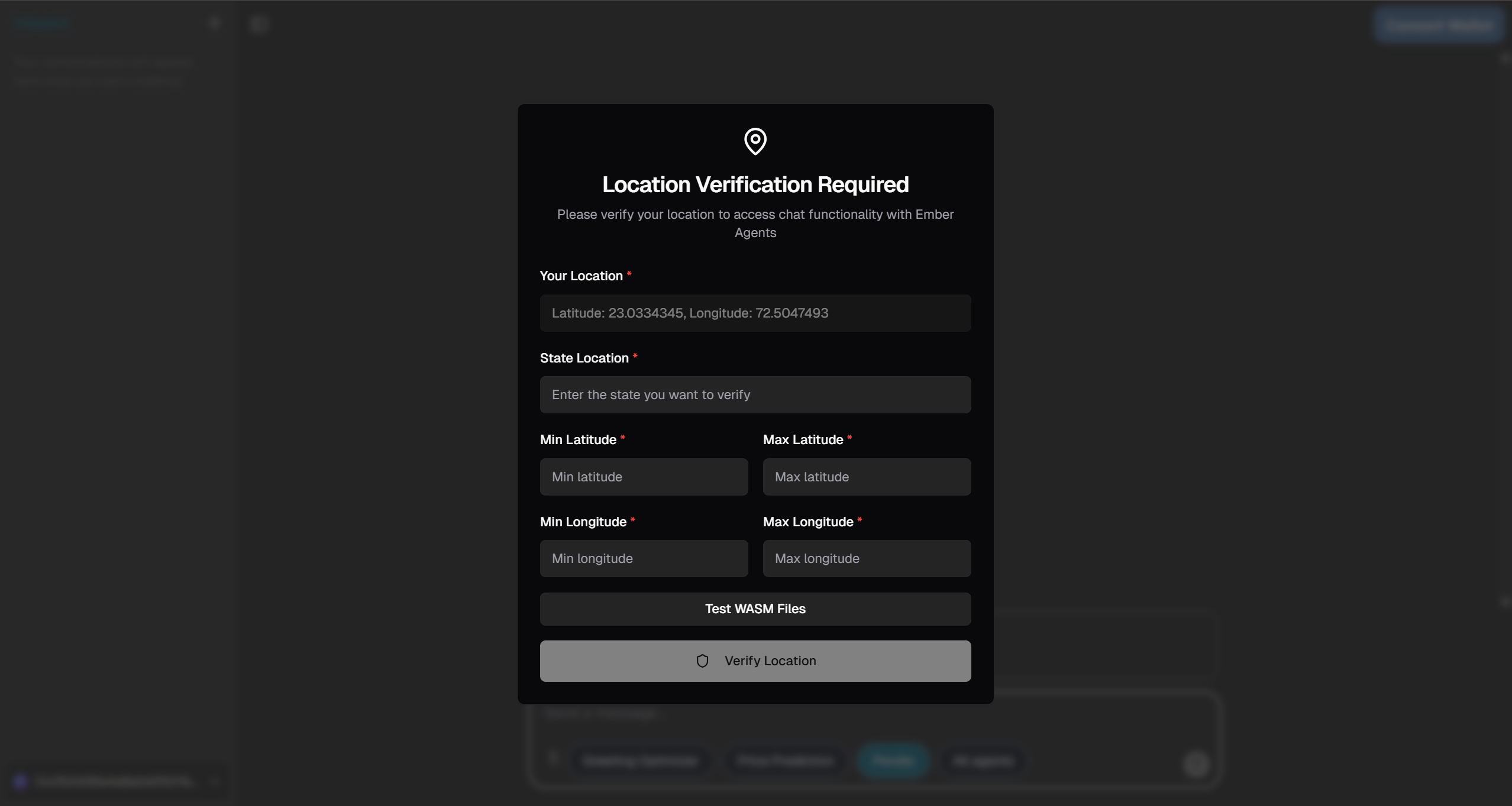
Example: Location Verification Required screen
🔐 Location Verification Process
How ZKP Location Verification Works
The system uses Zero-Knowledge Proofs to verify your location without revealing your exact coordinates:
- Circuit Design: ZKP logic is defined in
LocationVerifier.circomusing the Circom language - Proof Generation: Your browser generates a proof that you're within a specific geographic boundary
- On-Chain Verification: The proof is verified on the Arbitrum Stylus dev node
- Access Control: Only after successful verification can you access the Vibekit AI agents
Location Verification Features
- Private Verification: Your exact coordinates are never revealed
- Geographic Boundaries: Configurable bounding boxes for different regions
- Real-time Verification: Instant proof generation and verification
- Arbitrum Stylus: Ultra-fast verification using Rust-based smart contracts
🤖 Vibekit AI Agents
Once location verification is complete, you'll have access to three advanced AI agents:
1. 📈 Allora Price Prediction Agent
Port: 3008 | Container: allora-price-prediction-agent
Leverages decentralized prediction markets to provide AI-powered price forecasts for cryptocurrency tokens using Allora's machine learning inference network.
🎯 Available Actions:
suggestedActions: [
  {
    title: "Get BTC",
    label: "price prediction",
    action: "What is the price prediction for BTC?",
  },
  {
    title: "Get ETH",
    label: "price prediction",
    action: "What is the price prediction for ETH?",
  },
  {
    title: "Compare BTC and ETH",
    label: "predictions",
    action: "Get price predictions for both BTC and ETH",
  },
];
⚡️ Core Capabilities:
- Price Predictions: Get AI-powered price forecasts for major cryptocurrencies
- Topic Discovery: Automatically discover relevant prediction market topics
- Multi-Timeframe Analysis: Support for different prediction timeframes
- Market Intelligence: Access to Allora's decentralized ML inference network
- Real-time Data: Live prediction market data and confidence intervals
🎨 Action Examples:
Price Prediction Query:
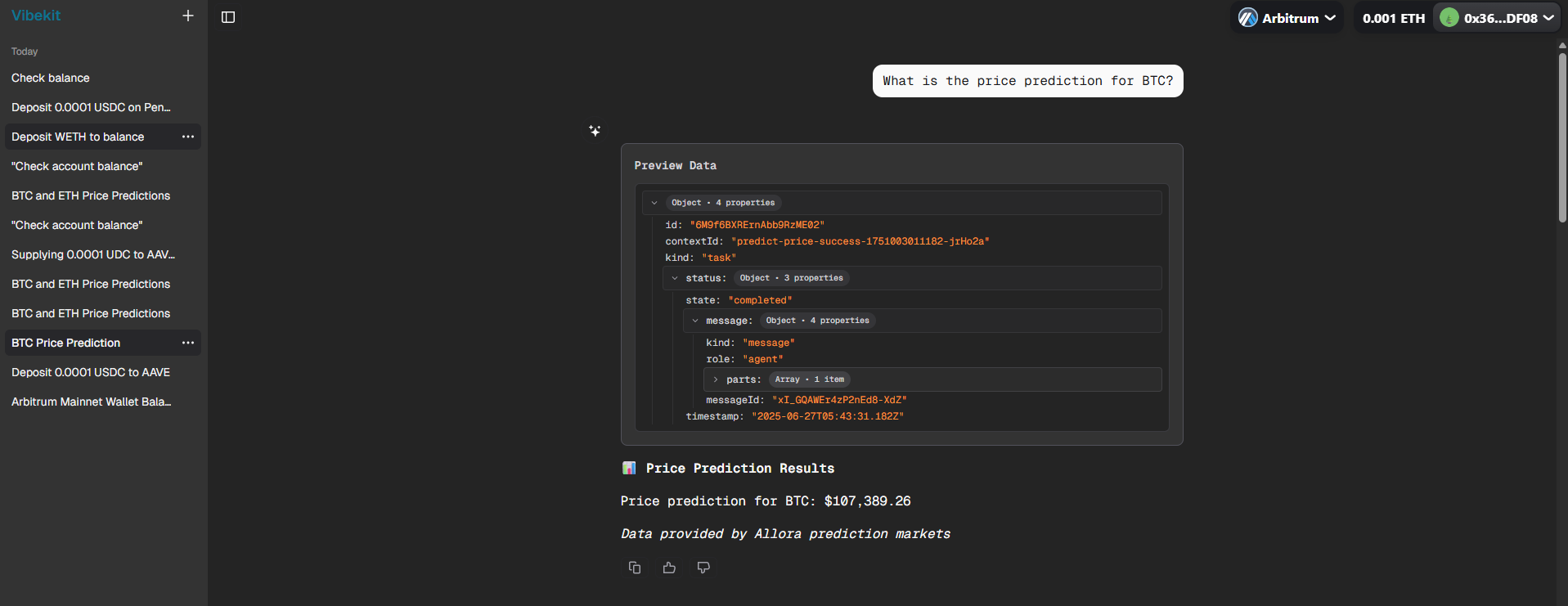 BTC price prediction transaction from the Allora agent
Market Analysis:
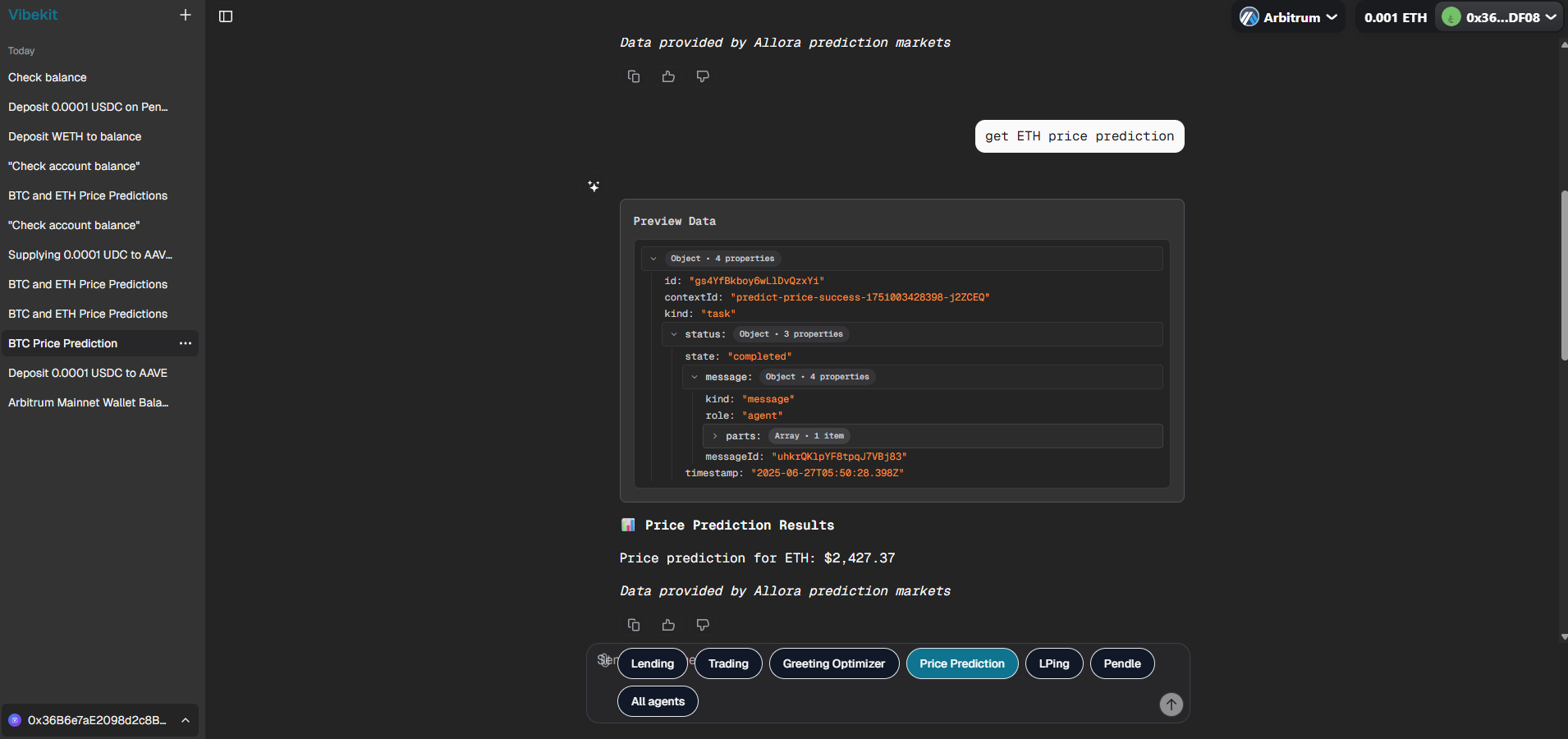 ETH price prediction transaction from the Allora agent
2. 💰 Pendle Yield Tokenization Agent
Port: 3003 | Container: pendle-agent
Specializes in yield tokenization strategies, enabling users to split yield-bearing assets into Principal Tokens (PT) and Yield Tokens (YT) for advanced yield farming and trading strategies.
🎯 Available Actions:
suggestedActions: [
  {
    title: "Deposit WETH",
    label: "to my balance",
    action: "Deposit WETH to my balance",
  },
  {
    title: "Check",
    label: "balance",
    action: "Check balance",
  },
];
⚡️ Core Capabilities:
- Yield Tokenization: Split yield-bearing assets into PT and YT tokens
- Market Discovery: Find optimal yield markets across multiple chains
- Swap Operations: Exchange between underlying assets, PT, and YT tokens
- Portfolio Analysis: Track yield positions and performance metrics
🎨 Action Examples:
Yield Market Discovery:
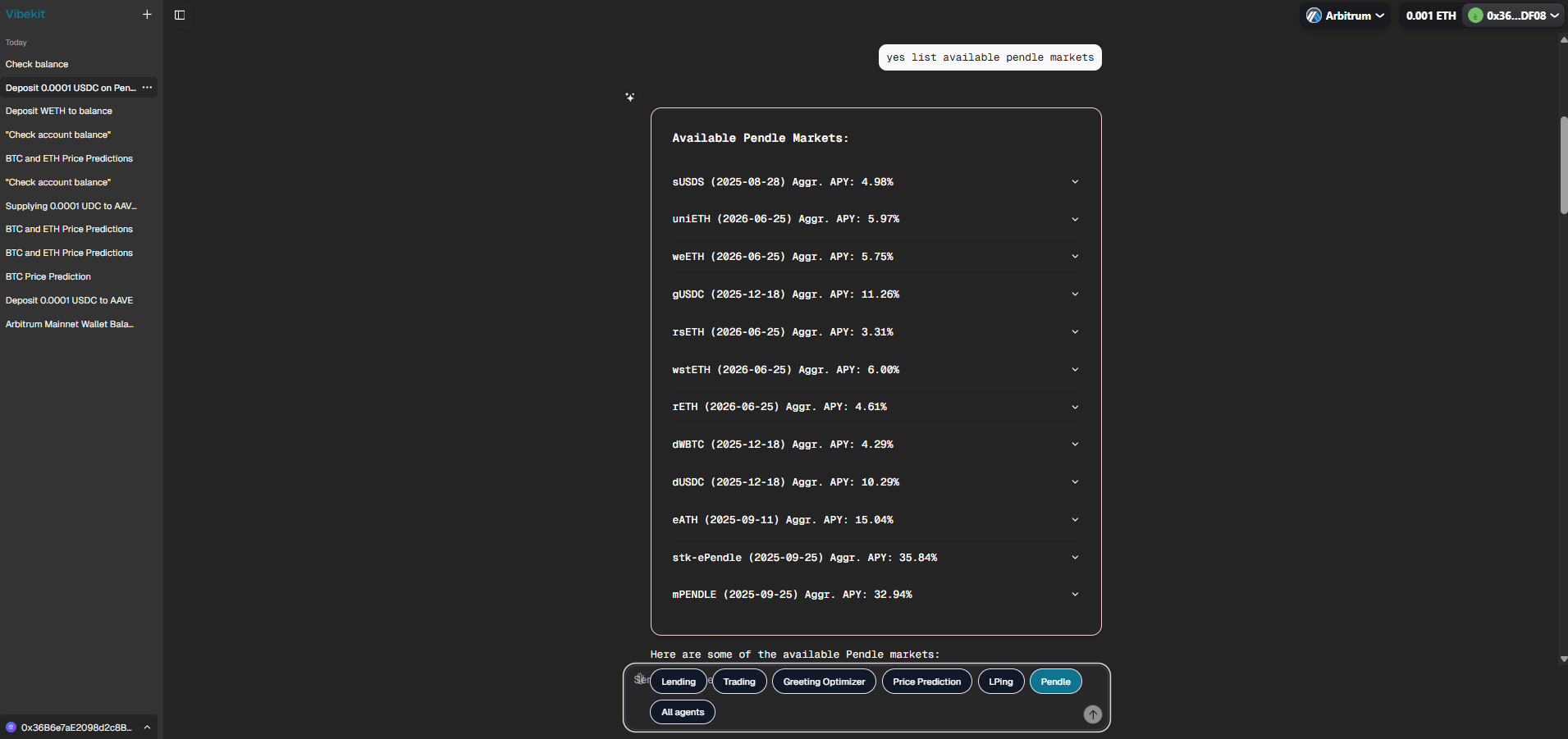 Available Pendle pools transaction view
Token Swap Execution:
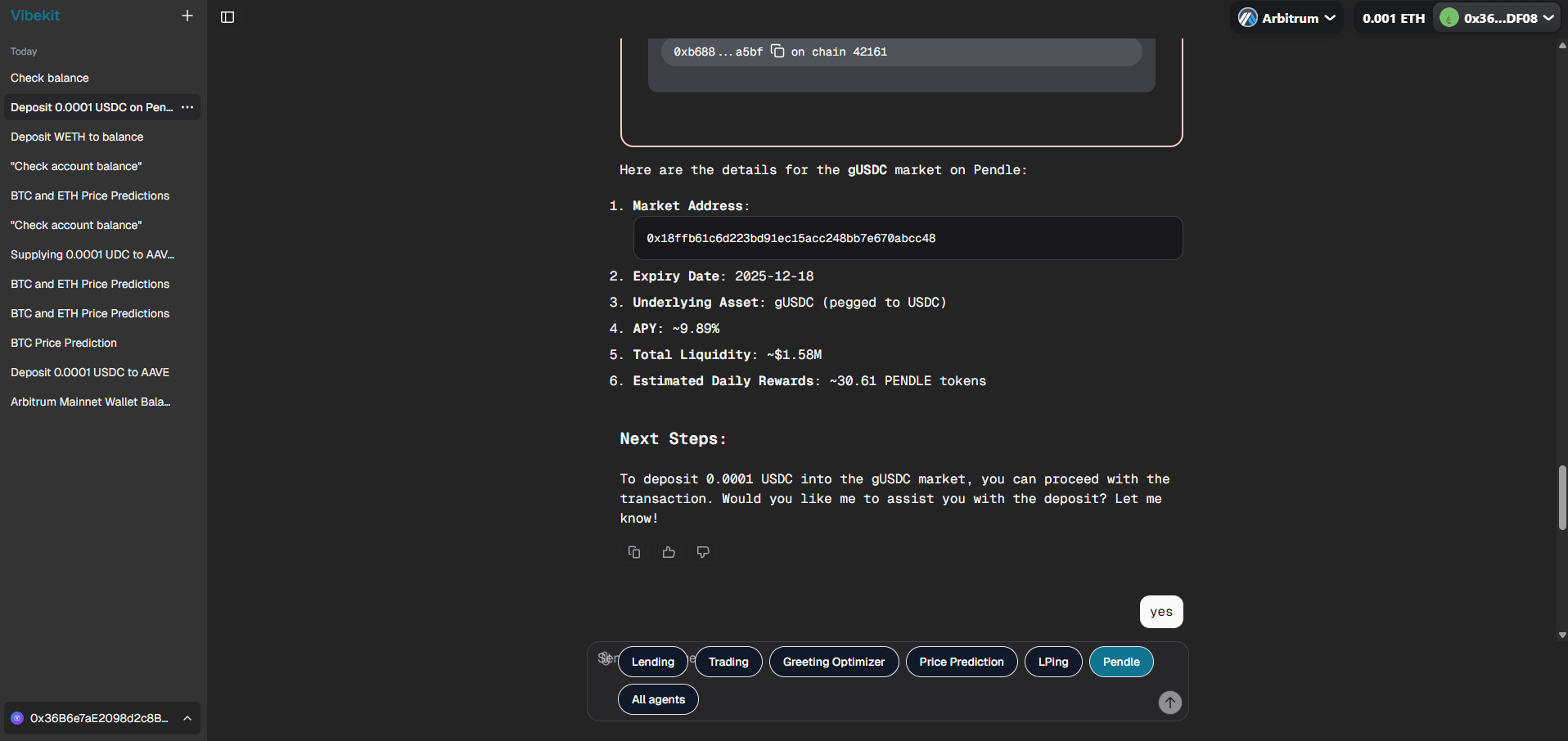 Pendle transaction example #1
Portfolio Overview:
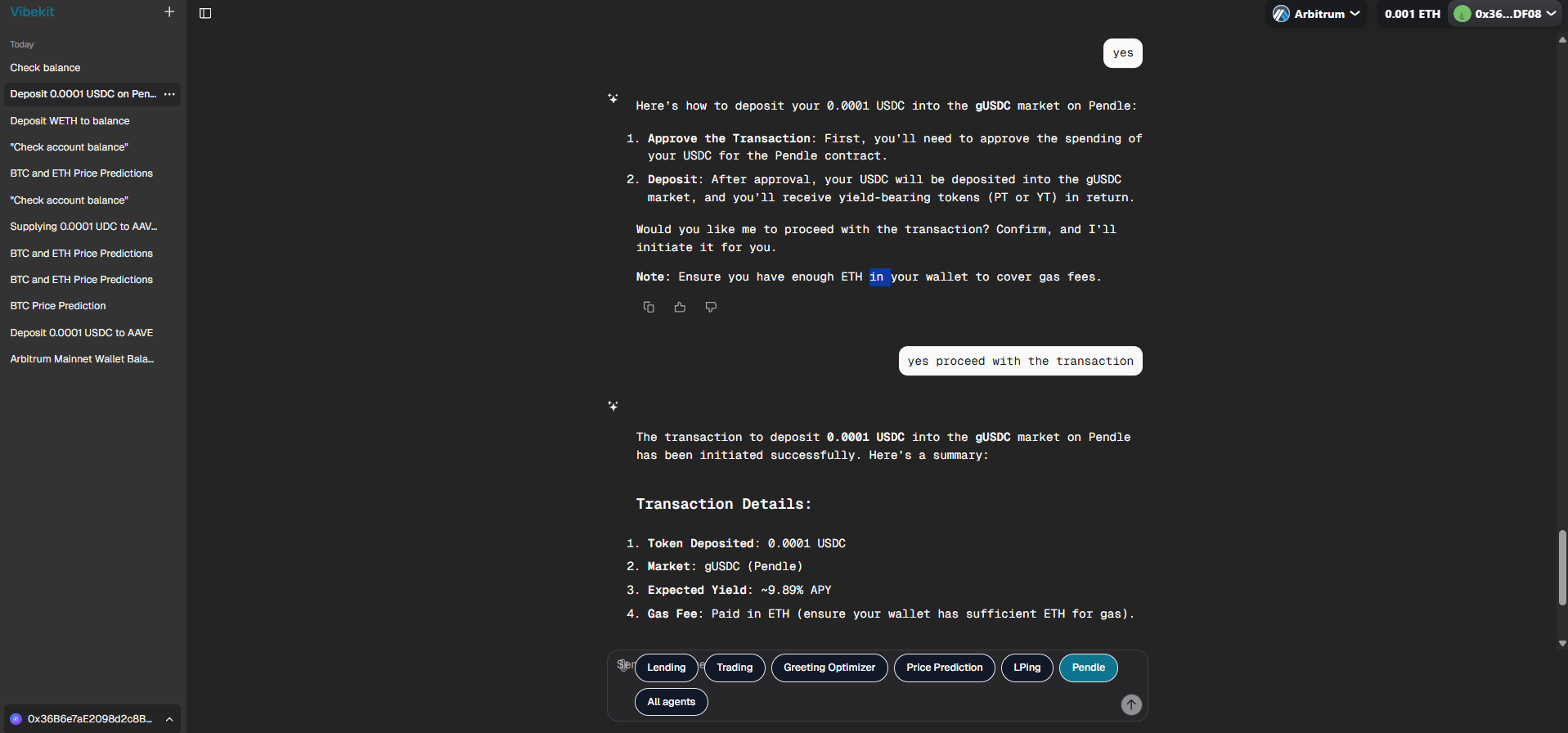 Pendle transaction example #2
3. 🔄 LangGraph Workflow Agent
Port: 3009 | Container: langgraph-workflow-agent
Demonstrates advanced AI workflow orchestration using LangGraph's state management system. It showcases iterative optimization processes with evaluator-optimizer patterns.
🎯 Available Actions:
suggestedActions: [
  {
    title: "Optimize",
    label: "hello",
    action: "Optimize: hello",
  },
  {
    title: "Make",
    label: "hi better",
    action: "Make this greeting better: hi",
  },
  {
    title: "Improve",
    label: "good morning",
    action: "Optimize: good morning",
  },
];
⚡️ Core Capabilities:
- Iterative Optimization: Multi-step workflow with state management
- AI Evaluation: Automated quality assessment with satisfaction metrics
- Conditional Logic: Smart termination based on satisfaction thresholds
- Workflow Visualization: Complete process history and decision tracking
- State Persistence: Maintains workflow state across iterations
🎨 Workflow Process:
- Generator Node: Creates initial or improved greeting based on input
- Evaluator Node: Assesses greeting quality across multiple criteria
- Optimizer Node: Provides specific feedback for improvement
- Conditional Logic: Determines whether to continue or terminate
- State Management: Tracks progress and maintains workflow history
🛠️ Advanced Features
🔧 Key Advanced Components
📈 Allora Agent Files:
index.ts- MCP server with AI model configurationskills/pricePrediction.ts- Skill definition with ML capabilitiestools/getPricePrediction.ts- AI prediction tool with hookshooks/pricePredictionHooks.ts- Topic discovery and response formatting
🔄 LangGraph Agent Files:
index.ts- Agent with workflow orchestrationskills/greeting-optimizer.ts- Workflow skill definitiontools/optimize-greeting.ts- LangGraph workflow executionworkflow/- Complete state management and node definitions
💰 Pendle Agent Files:
index.ts- MCP server with yield market integrationagent.ts- Main agent with token mapping and market discoveryagentToolHandlers.ts- Yield tokenization operations- Multi-chain support with automatic token resolution
🎯 Advanced Error Handling
Sophisticated error recovery mechanisms:
- AI Model Failures: Automatic fallback to alternative models
- Prediction Timeouts: Graceful degradation with cached results
- Workflow Interruptions: State preservation and recovery
- Market Data Issues: Real-time validation and error correction
🚀 Deployment
Production Deployment
To deploy your application to production:
-
Deploy ZKP contracts to Arbitrum Sepolia:
cd locationVerifier/packages/cargo-stylus cargo stylus deploy --network arbitrum-sepolia -
Deploy Vibekit frontend to Vercel:
cd arbitrum-vibekit/typescript
vercel --prod
Environment Variables
Ensure you have the following environment variables configured:
# Allora API Key (for price predictions)
ALLORA_API_KEY=your_allora_api_key

# Database URL (for Vibekit)
POSTGRES_URL=your_database_url

# Arbitrum RPC URL
ARBITRUM_RPC_URL=your_arbitrum_rpc_url
⚡️ Cache Your Deployed Contract for Faster, Cheaper Access
📖 Contracts deployed on Arbitrum Sepolia can use this command for gas benefits, time savings, and cheaper contract function calls. Our backend will benchmark and place bids on your behalf to ensure your contract is not evicted from the CacheManager contract, fully automating this process for you.
Before caching your contract, make sure you have installed the Smart Cache CLI globally:
npm install -g smart-cache-cli
After deploying your contract to Arbitrum Sepolia, you can cache your contract address using the smart-cache CLI. Caching your contract enables:
- 🚀 Faster contract function calls by reducing lookup time
- 💸 Cheaper interactions by optimizing access to contract data
- 🌐 Seamless access to your contract from any environment or system
💡 Info: Both the
<address>and--deployed-byflags are mandatory when adding a contract to the cache.
📝 Simple Example
smart-cache add <CONTRACT_ADDRESS> --deployed-by <YOUR_WALLET_ADDRESS_WITH_WHOM_YOU_HAVE_DEPLOYED_CONTRACT>
🛠️ Advanced Example
smart-cache add 0xYourContractAddress \
  --deployed-by 0xYourWalletAddress \
  --network arbitrum-sepolia \
  --tx-hash 0xYourDeploymentTxHash \
  --name "YourContractName" \
  --version "1.0.0"
<CONTRACT_ADDRESS>: The address of your deployed contract (required)--deployed-by: The wallet address you used to deploy the contract (required)--network arbitrum-sepolia: By default, contracts are cached for the Arbitrum Sepolia network for optimal benchmarking and compatibility--tx-hash,--name,--version: Optional metadata for better organization
⚠️ Warning: If you omit the required fields, the command will not work as expected.
💡 For more options, run
smart-cache add --help.
For more in-depth details and the latest updates, visit the smart-cache-cli package on npmjs.com.
🏁 Next Steps
Explore more challenges or contribute to this project!
🏃 Head to your next challenge here.
📚 Complete Architecture Documentation
For users who want to understand the complete end-to-end architecture, including:
- 🏗️ Complete Agent Architecture: Detailed breakdown of all agent components and interactions
- 📡 MCP Server Implementation: How Model Context Protocol servers are structured and communicate
- 🤖 AI Model Integration: How LLMs process user requests and orchestrate multi-step operations
- 🔄 Request Processing Flow: Complete user-to-blockchain transaction lifecycle
- 🛠️ Tool & Skill Framework: Advanced patterns for building custom agents
- ⛓️ Blockchain Integration: Low-level protocol interactions and transaction management
- 🔐 Security & Error Handling: Comprehensive safety mechanisms and recovery strategies
Visit the complete repository documentation at: Vibekit Architecture Deep Dive
💡 Pro Tip: The DeepWiki documentation provides interactive code examples and detailed explanations that complement the Vibekit agents workflow perfectly!